
Query and audit
Document, view, levels, categories, families, types, parameters, warnings, quantities and active selection.
It does more than talk to Revit. Create, document, modify and verify the model from Claude, Codex or JQBIM web chat.
Walls, floors, dimensions, schedules, materials, parameters and families through the native Revit API. When advanced work goes beyond the catalog, JQBIM can build a controlled path and return evidence to the conversation.

The published build was compiled, extracted, upgraded and installed on Windows. Revit 2026, Revit 2027 and the MCP server passed their automated test suites.
The final result depends on the AI model, but these operations already exist and were verified in JQBIM.
Document, view, levels, categories, families, types, parameters, warnings, quantities and active selection.
Filter, select, isolate, restore, open views and apply temporary graphics.
Create schedules, dimensions, tags and parameters; duplicate views; place views on sheets and export PDF.
Rename, move, copy, paint faces, create materials and perform native verified changes.
Create or edit parametric families and solve out-of-catalog tasks with Claude or Codex and sufficient context.
Inspect first, prefer typed tools, confirm destructive actions and verify after every write.
JQBIM combines direct operations for daily work with an extensible path for tasks that require deeper reasoning.
Claude and Codex first inspect the MCP catalog. If an advanced function is not published as a direct tool, JQBIM can build a bounded Revit API operation, execute it through the same MCP and verify the result inside the model.
Interprets the intent, project context and expected result.
Uses a typed tool or a controlled extension over the native Revit API.
Queries the model again and returns evidence, not only a text response.
For queries, selection and daily commands. Saves tokens but is subject to quotas, saturation and variable provider capability.
Start at no costLower-cost options with better availability or comprehension depending on the model. Payment does not automatically make them equivalent to Claude or Codex agents.
Balance cost and powerAgent clients for planning, broad context, families and out-of-catalog operations. They require subscriptions or credits and professional verification.
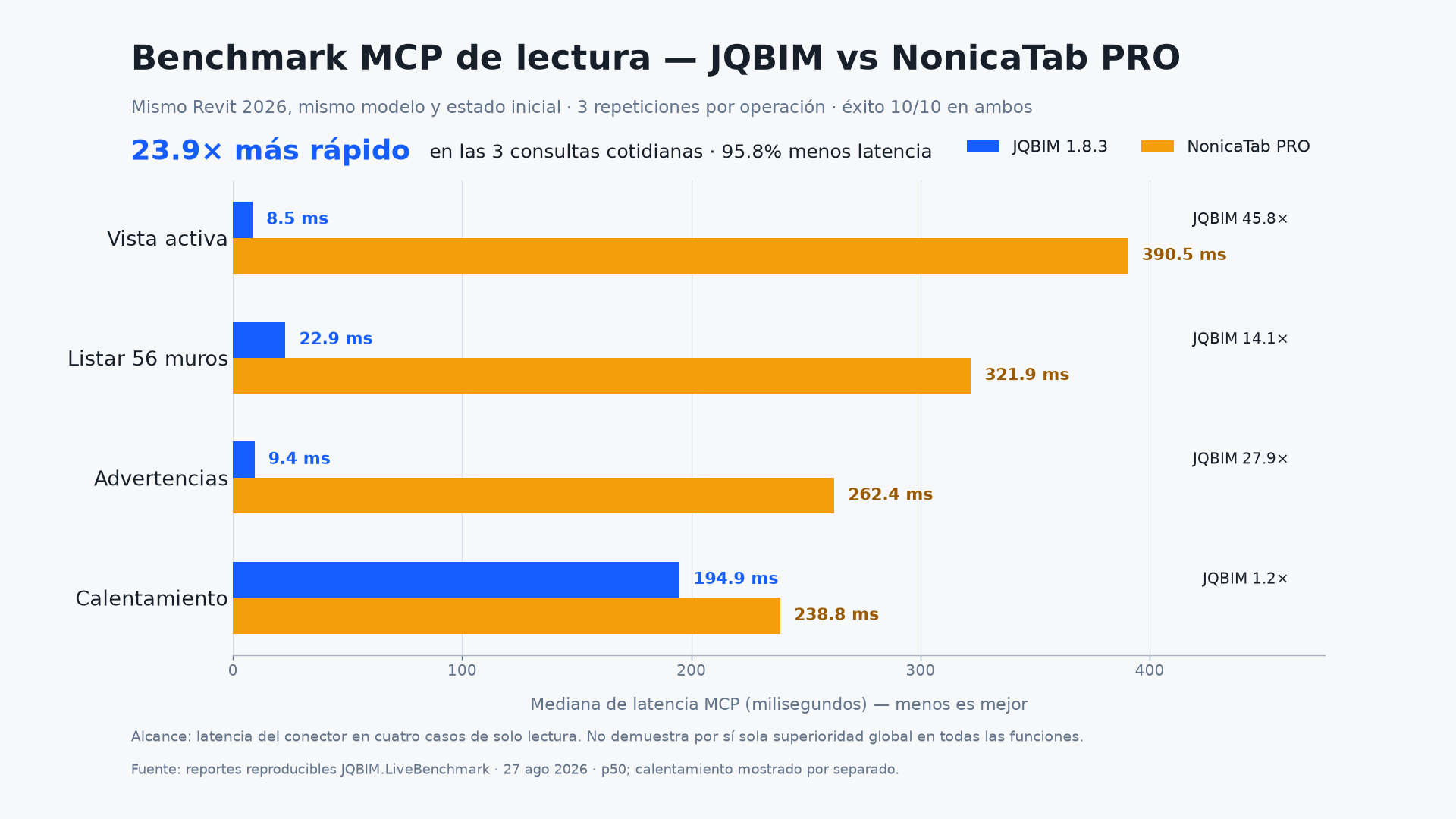
Maximum extensibilityJQBIM and NonicaTab PRO completed 100% of the cases. Across four comparable reads, JQBIM recorded a combined median 23.88 times faster. This is a scoped read benchmark, not a claim of global superiority.
| Capability | JQBIM MCP | Nonica | Autodesk MCP |
|---|---|---|---|
| BIM reading and queries | Yes | Yes | Yes, preview |
| Writing to Revit | Yes | Published tools | Limited in preview |
| Family creation and editing | Demonstrated | Not publicly documented | Not publicly documented |
| Dynamic out-of-catalog path | Demonstrated | Not publicly documented | Not publicly documented |
| Revit 2026 and 2027 | Yes | Depends on installed version | Revit 2027 |
Save the MSI in a known folder. Close Revit before running it.
Open the MSI, accept the license and finish the wizard. It installs the Revit 2026 and 2027 components.
Load a test project. On the JQBIM ribbon, choose Connect MCP and select Claude, Codex or cloud chat.
Ask Claude or Codex whether JQBIM/Revit MCP is active. The client must query the server, not control the screen.
State the document, view, level, category, scope and expected result. Complex tasks improve with verifiable goals.
JQBIM should query Revit again before declaring completion. Do not save unverified test changes.
Sign in to OpenRouter, open API Keys, create a key and copy it in full. Credit, limits and usage belong to that account.
Open cloud chat, paste your OpenRouter API key and enable secure Windows storage if you want it remembered.
Filter free models or show paid models available through OpenRouter. Catalog, quota and saturation may change.
Start with Hello, query the active view, then try a reversible task. Switch models when one is saturated.
The key was rejected or does not authorize the model.
The account needs credit or the output exceeds the available limit.
The provider reached its quota or is temporarily saturated.
Model latency is not Revit execution speed. Wait before repeating to avoid duplicate operations.
The included guide requires inspection before modification, typed MCP tools, model preservation and result verification. Screen control is reserved exclusively for a blocking modal dialog; it is never used to model, navigate or edit Revit.
JQBIM can already be tested and used in supervised workflows. We do not promise that every phrase or AI model performs equally. The catalog, direct routes and validation will continue to grow with Revit and agent technology.
The JQBIM MCP installer is offered at no cost. Claude, Codex and model providers may apply their own subscriptions, credits or limits.
Yes. JQBIM has demonstrated family creation and editing through its extensible path. This advanced task requires context, review and an agent client such as Claude or Codex.
No. They share the same BIM engine, but understanding, speed, quota and reliability depend on the model and provider.
Not for routine work. Every BIM operation runs through MCP. Visual control is allowed only to resolve a modal dialog that blocks the session.
Download JQBIM MCP, connect your AI client and turn the conversation into native, editable and verifiable BIM operations.